One Click in User Management — and Four Nights of Troubleshooting
Why a reset Windows password can irretrievably destroy a user profile.
It starts innocuously. A workstation reports an error when starting Outlook:
Device TPM Problem
There is a problem with the Trusted Platform Module (TPM) on your device.
Error code:
-2146893813
A TPM problem, then. The security chip. Sounded like hardware. Sounded manageable.
It was neither one nor the other.
What We Checked First
We started with the obvious path. The TPM reported perfect health: initialized, memory-ready, no lockout, no errors in the event log. A module with current firmware, technically flawless.
So we moved on. Office token caches were renamed — Windows recreated them, but the error persisted. In the user branch of the registry, we found an orphaned Workplace Join registration pointing to a certificate that no longer existed in the certificate store. It looked like a promising lead. We cleaned it up. The error remained.
Then a look at the system's crypto folders: 1,794 key blobs, all created within two days in June. Something had been attempting to create a key every few seconds over a 48-hour period, failing each time and leaving the rest behind. An impressive symptom — but only a symptom.
The BIOS was two years old. We updated it. The error remained.
At this point, clearing the TPM was the next step we were considering. It would have been the wrong decision.
The Sentence That Changed Everything
"The account worked fine until we removed the user password through MMC."
An offhand remark. And the complete explanation.
What Actually Happens
Windows protects local secrets using the Data Protection API, or DPAPI. Stored passwords, certificate private keys, sign-in tokens from Office and Microsoft 365 — they all depend on something called a master key. And this master key is encrypted with the user's password.
This is the crucial difference that the interface doesn't explain:
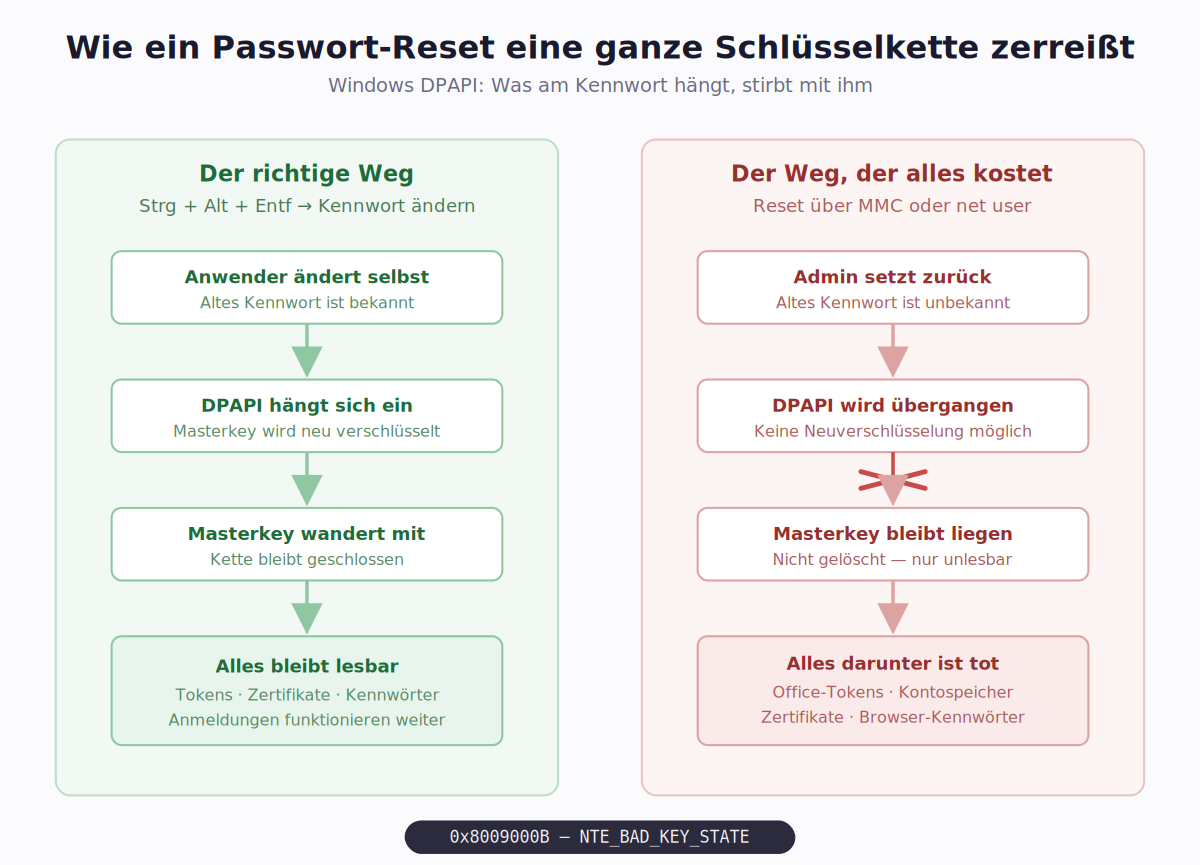
When a user changes their password themselves via Ctrl+Alt+Delete, DPAPI hooks into the process. The old password is known at that moment, the master key is decrypted and re-encrypted with the new password. The chain remains intact, everything stays readable.
When an administrator resets the password — through Computer Management, via net user, or any other administrative tool — that information is missing. The administrator doesn't know the old password. The master key cannot be decrypted and cannot be re-encrypted.
It isn't deleted. It remains. Only now it's forever unreadable.
And with it, everything that depended on it.
The error code 0x8009000B translates to: The key is not valid in the specified state. Not a TPM error. A DPAPI error that Microsoft simply mislabeled in this dialog.
Windows does warn when resetting — with a notice about possible data loss. In a domain, a server-side backup of the master key catches this case. On a standalone machine, there's no such safety net.
Why the Repair Still Failed
We had the diagnosis. The remedy was clear: delete the master keys so Windows can build a fresh chain.
And it worked. A test afterward confirmed that local encryption was working properly again.
But Outlook kept reporting the same error.
What followed was a week of peeling back layers. At each step, we found another cache with dead key material:
| Location | Oldest Entry |
|---|---|
| Office token caches | 2019 |
| DPAPI master keys | 2019 |
| Key containers, two separate branches | 2025 |
| Orphaned device registration from a previous tenant | — |
| Accounts stored in Windows account store | 44 entries, oldest from 2021 |
| Cached mailboxes | four orphaned, untouched for ten months |
After each cleanup, the same error came back.
The Real Finding
At some point it became clear we weren't treating a problem — we were treating a symptom of something more fundamental.
This user profile had been migrated over seven years and across multiple machines. It carried key material from an era when the current hardware didn't yet exist. It contained remnants from two different Microsoft 365 tenants, the cached mailbox of a colleague who left long ago, and caches that no one could identify anymore.
Out of 237 gigabytes of disk space, 12 remained. Of that, 76 gigabytes alone were Outlook cache, another 10 or so were temporary files. The user's actual work data: 1.44 gigabytes.
A profile in this state isn't repairable in the sense of "one more fix." Every remainder we found led to the next.
The Honest Conclusion
We stopped trying to repair it and set up a new user profile.
We migrated the actual user data and browser bookmarks — both unencrypted files that travel without issue. We deliberately did not migrate anything DPAPI-encrypted: stored passwords, sign-in credentials, all Microsoft application data. That's exactly what would have imported the problem into the new profile.
The saved passwords were lost anyway. They'd been nothing but dead entries in lists no one could decrypt since the reset.
Time to set up the new profile: around two hours. Time spent on the preceding troubleshooting: many times that.
Not every problem is a repair case. Sometimes the most honest diagnosis is that the foundation no longer holds.
What We Take Away
Never reset local passwords administratively. On a machine without domain membership, there's no safety net. The user changes their password themselves via Ctrl+Alt+Delete — only that path preserves the key chain. If the password truly cannot be recovered, you must know that you'll lose all locally protected secrets in the process.
A reset password can still be recovered. As long as the old value is known, resetting it back to that same value restores access. The master keys are never deleted — they wait. But this chance only exists as long as someone still knows the old value.
Error messages don't lie, but they sometimes point in the wrong direction. "Device TPM Problem" cost us days. The real clue was in the error code, not the title.
User profiles have a lifespan. A profile that migrates over years and across multiple devices accumulates state that no one can untangle anymore. With a machine transition, a fresh profile with selective data migration is often the better economics — even if it looks more expensive at the moment.
An offhand remark can be worth more than any diagnosis. The crucial information didn't come from a tool. It came from a casual mention of what had been changed before. Asking about that belongs at the beginning of every troubleshooting session — not in the middle.
All information in this article is anonymized. Names, addresses, identifiers, and system designations have been removed or generalized.