The Browser Keeps Serving the Old Version
A new version sits on the server and the browser still serves the old one. The reason is in the HTTP specification. The fix is a few lines of JavaScript and a 27-byte file.
tools.bitblade.io hosts a few small utilities: a date calculator, a working time helper, an activities tracker. Each one is exactly one HTML file. No backend, no database, no login. What someone enters stays in their browser's localStorage and doesn't leave the device.
That comes at a price which stays invisible for a long time. There's no server to tell an open browser that something new exists. We upload a new file — and whoever has the page open or visits it the next day may keep working with the old version for weeks.
Why the browser keeps the old file
That's not a bug, that's the specification. This is how the server responds to the tool page:
HTTP/2 200
server: nginx
content-type: text/html; charset=UTF-8
content-length: 62793
last-modified: Sun, 20 Sep 2026 11:24:10 GMT
etag: "f549-65be85f56b530"
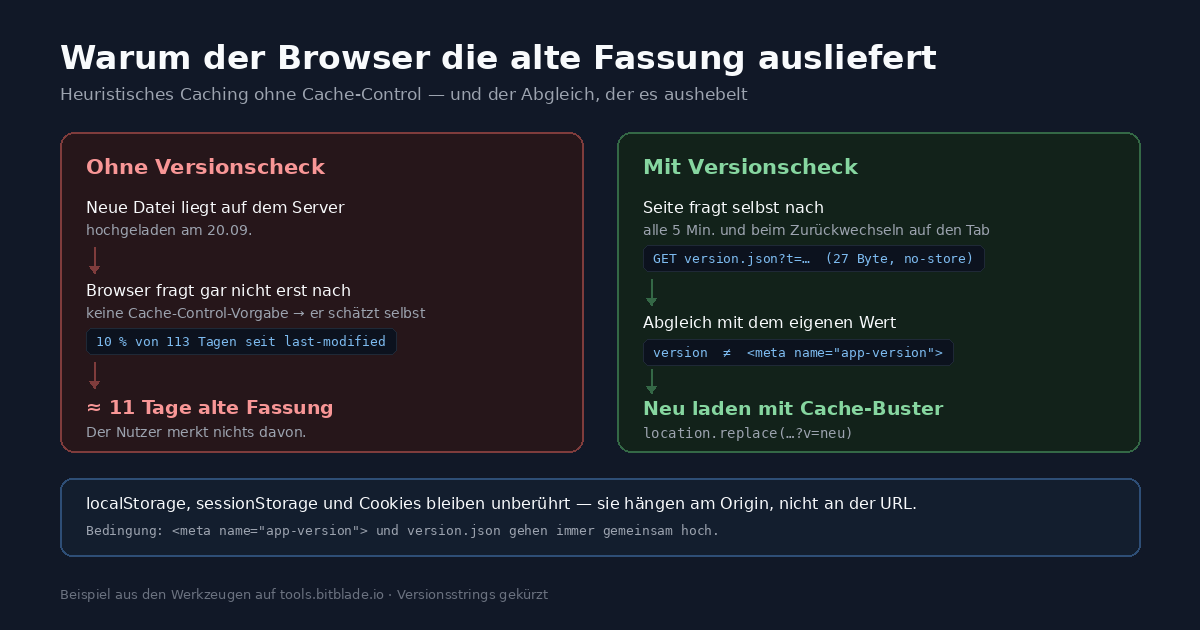
What is missing matters more: no Cache-Control, no Expires. Without these directives, the browser is allowed to guess how long the response stays fresh — heuristic caching, described in RFC 9111, section 4.2.2. The common heuristic takes one tenth of the time that has passed since the last modification.
The file we replaced had been unchanged on the server since May 30. When accessed in September it was thus around 113 days old, and a tenth of that is a little over eleven days. Eleven days in which the browser serves the page without asking the server at all.
So the effect runs exactly backwards: the longer a file has been stable, the harder the browser clings to the old version.
Why "just Ctrl+F5" isn't an answer
You can tell people to hard refresh the page. That assumes they know there's something new. That's exactly what they don't know — otherwise they wouldn't need the tip.
The next suggestion is usually "clear browser data". In the common browsers that switch is not labelled "Clear cache" but "Cookies and other site data". Site data, that includes localStorage. For a tool whose entire content lives in localStorage, this click is not a maintenance step, but data loss: whoever entered three months of working time will no longer have it.
That made the requirement clear. The page has to notice by itself that it is outdated, and renew itself without touching anything the user has entered.
The check: two values that belong together
The page carries its version in the head:
<meta name="app-version" content="2026-09-20.2" />Next to it in the same directory is a file version.json:
{"version":"2026-09-20.2"}27 bytes. The page reads its own value from the meta tag, fetches the other from the server and compares:
fetch('version.json?t=' + Date.now(), { cache: 'no-store' })
  .then(r => r.json())
  .then(d => {
    if (d.version && d.version !== APP_VERSION) announce(d.version);
  });
Two precautions against exactly the problem being solved here: cache: 'no-store' bypasses the browser cache, the timestamp in the query string bypasses everything else that might cache along the way.
The check runs eight seconds after load, then every five minutes, plus on visibilitychange, focus and online. The tab open since yesterday notices when switching back that something changed, instead of waiting another five minutes.
Why not just ETag or Last-Modified
The obvious objection: the headers are there. A HEAD request to its own address delivers ETag and Last-Modified, and the second file would be redundant.
The catch is the reference point. The running page would need to know what ETag its own content had — and that's precisely what it doesn't know. The case we're addressing is the one where it came from the cache itself and is outdated.
A comparison against a server value fetched at startup would never catch this case: on the first retrieval the server is always "current", after that it only registers changes made from that moment on. A comparison against a compiled build time fails the other way around — the file on the server is always later dated than the timestamp we write in before uploading. That becomes an endless loop.
A version number written identically into both files leaves no such doubt. It costs one additional file and the discipline to upload both together.
Reload without discarding anything
const u = new URL(location.href);
u.searchParams.set('v', neueVersion);
location.replace(u.toString());
The query parameter is the whole point. For the cache, /taetigkeiten/?v=2026-09-20.3 is a different resource from /taetigkeiten/, so the file is actually fetched from the server instead of from the cache. location.reload(true) would be the reflex — the argument has no effect in any current browser.
What explicitly does not happen: localStorage, sessionStorage and cookies are tied to the origin, not to the individual URL. An additional query parameter doesn't change the origin. The entered data stays put. We checked it: with a localStorage entry and a test cookie set before the reload, both were still there afterwards, unchanged.
location.replace instead of assignment to location.href, so the outdated version doesn't stay behind as a history entry that “back” would return to. The new version clears the ?v= parameter out of the address bar right after it starts:
history.replaceState(null, '', location.pathname);Two safeguards
Don't reload while someone is typing. If focus is in an input field when the new version arrives, the reload waits and checks again shortly after. A form that pulls itself away while someone is filling it in would be worse than an outdated page.
function isTyping() {
  const el = document.activeElement;
  if (!el) return false;
  const t = (el.tagName || '').toLowerCase();
  if (t === 'textarea' || t === 'select') return true;
  if (t !== 'input') return false;
  return ['text','search','number','date','time','color','email','url']
    .indexOf((el.type || 'text').toLowerCase()) !== -1;
}
A loop guard. If version.json reports a version that the HTML file never gets — because an upload only half completed or a file was forgotten — the page otherwise reloads endlessly. A counter in sessionStorage limits it to two attempts. After that only the notice bar remains, asking for a manual reload.
sessionStorage and not localStorage: the counter should disappear with the tab and not persist permanently alongside user data.
What it costs
Per open tab one request of 27 bytes every five minutes, plus one each time the tab gets focus again. No build step, no Service Worker, no server component, no additional dependency.
A Service Worker could do the same and more — offline operation, precise control over what's cached when. It brings its own lifecycle in exchange: installation, waiting state, skipWaiting, clients.claim, and the known quirk that a faulty Service Worker itself persists stubbornly. For a single HTML file with no offline requirement, that is out of proportion.
The condition that remains
The approach has a price, and it's called discipline: with every change, both values must go up together, the one in the meta tag and the one in version.json.
If version.json is forgotten, nothing happens — nobody gets the new version and nobody notices. If the HTML file is forgotten, the loop guard kicks in after two reloads. The second error shows itself immediately, the first stays silent. That's why we tie the version string to the deployment date and set it in both places in the same step, not after the fact.
At the root: the headers
For completeness, the other half of the solution belongs here. A Cache-Control: no-cache for HTML documents forces the browser to check with the server before every delivery; stylesheets, scripts and images get a long lifetime and a versioned filename in return. Anyone with access to server configuration should set this up — it ends the heuristic guessing.
One case it does not solve: the tab that has been open since yesterday. That one stops asking anyone. So the two approaches complement each other — the headers for the next visit, the version check for the session already running.
Where the pattern fits elsewhere
Anywhere static files are served without a deployment pipeline and still have to be current: internal tools, landing pages, documentation and status pages, price lists. Two files, one check, one reload that doesn't touch anything the user owns.
The code excerpts are from the activities tracker at tools.bitblade.io and are shortened for readability.