When the Connector Isn't Broken — the Key Changed in the Background
At 9:35 p.m. on October 11, 2026, the TI connector at a dental practice we support reported: connection dropped. The connector wasn't broken – the cause was a nationwide DNSSEC key rollover, coinciding with the retirement of old RSA certificates. Workaround, verification steps, and one open finding.
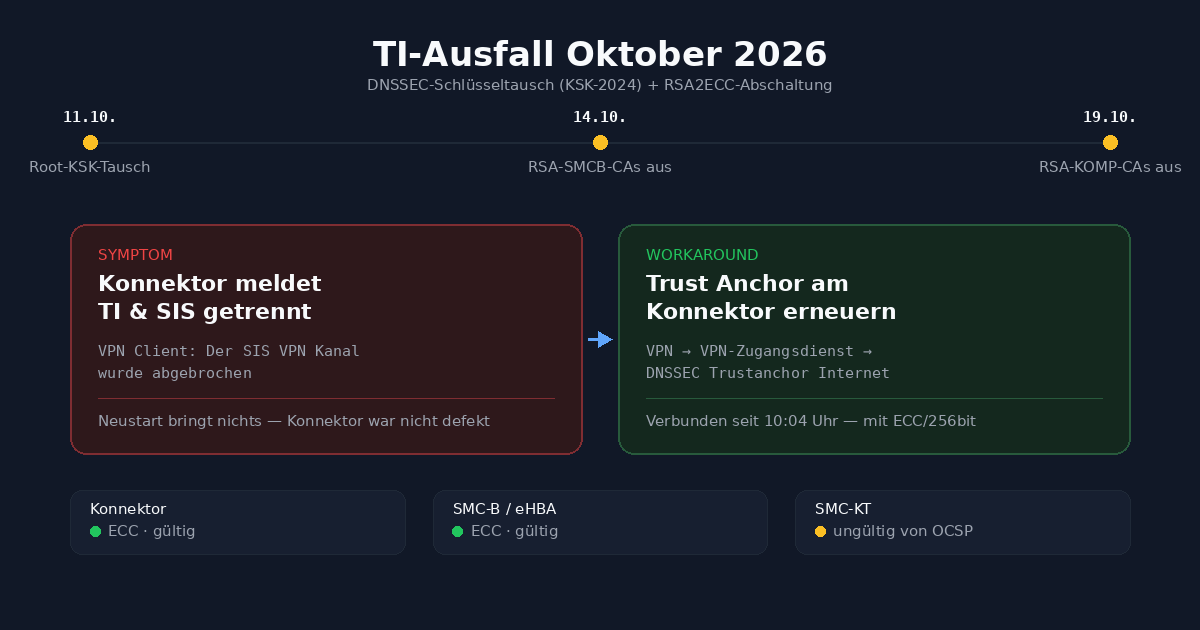
9:35 p.m., October 11, 2026: The TI connector at a dental practice we support reports that its connection to the telematics infrastructure (TI) has dropped. No card reading, no KIM, no eAU signature. The next morning we try the obvious: power the connector down and restart it. No effect. The message stays the same: "Verbindungsaufbau des TI VPN Kanals wurde abgebrochen" ("Connection setup for the TI VPN channel was aborted").
The connector was never faulty. The cause lay neither with the practice nor with its internet connection, but in a nationwide key rollover in the Domain Name System that had been announced for years, coinciding with a second, independent deadline for old TI certificates. Both hit nearly every TI-connected practice in Germany in October 2026.
Why a restart is the wrong move here
A connector that loses its TI connection invites a reflexive restart. For this error pattern, gematik explicitly advises against exactly that as long as the cause is not understood: a connector that restarts at the wrong moment can generate additional, overlapping error states and thereby mask the actual cause instead of exposing it. We only performed the restart again at the very end, after the cause was established and the correction was already in place.
Two planned changes, one shared month
On October 11, 2026, ICANN triggered the so-called root KSK (Key Signing Key) rollover in DNS – a scheduled key changeover designated KSK-2024 (KeyTag 38696). The TI connector cryptographically checks the DNS responses it receives for resolving TI endpoints against precisely this key (DNSSEC). A connector whose stored trust anchor still contains the old key suddenly rates every DNS response for the TI namespaces as untrustworthy – and refuses to set up the VPN connection, even though the internet connection, router and connector hardware are all working perfectly.
In parallel, two further independent deadlines took effect: on October 14, 2026, the status of the RSA certificate authorities for practice cards (RSA-SMCB-CAs) was set to "revoked" in the TI trust service list (TSL), and on October 19, 2026, the stage-2 OIDs for the component CAs (Komp-CA) were removed from the TSL. According to gematik, the RSA Komp-CAs themselves will only be removed on April 1, 2027. Both dates are part of the long-running migration from RSA to ECC certificates (RSA2ECC) for the connector, practice card (SMC-B), health professional card (eHBA), card terminal (SMC-KT) and the connector's own security modules (SMC-K).
For troubleshooting, this is the real difficulty: from the outside, a connector that loses its TI connection looks identical in both cases. The error message alone cannot tell you whether DNS, a certificate or something else is the cause.
The workaround: updating the trust anchor on the connector
For the secunet connector – the most common type among the practices we support – the procedure is as follows:
- In the connector administration interface (
https://<connector-IP>:8500— the interface itself is German-language only), under VPN → VPN-Zugangsdienst → VPN-Zugangsdienstanbieter (VPN access service → VPN access service provider), open the entry "DNSSEC Trustanchor Internet" (DNSSEC trust anchor Internet). - Back up the current content before changing anything – a simple copy of the existing XML is enough.
- Replace the entry with the current trust anchor list officially published by gematik, which contains the new key KSK-2024 (KeyTag 38696).
- Save, then fully restart the connector – now, not before.
- After the restart, check the TI status: "VPN-Verbindung TI" and "VPN-Verbindung SIS" (VPN connection TI / SIS) should show "Verbunden" (Connected), and the log message should read "… with ECC/256bit" instead of the old RSA variant.
Trust anchor values should not be copied and pasted from a guide into the connector interface, not even from this one. This is security-relevant cryptographic material that should be obtained exclusively from the official gematik source – an outdated or incorrectly transcribed copy could, in the worst case, open exactly the gap that DNSSEC is meant to close.
At the practice in this case, the connection was back from 10:04 a.m. – TI and SIS at the same time, with the message "SIS VPN Kanal wurde aufgebaut (mit ECC/256bit)" ("SIS VPN channel was established, with ECC/256bit").
How long does this workaround last?
The KSK-2024 key has no fixed expiry date. It remains valid until ICANN carries out the next key rollover – its predecessor, KSK-2017, was in use for roughly nine years. The workaround is therefore a lasting fix, not just a stopgap. It is important to leave automatic firmware updates enabled on the connector, so that future trust anchor changes do not have to be entered manually again once the vendor delivers them via firmware.
The second part: ECC instead of RSA, component by component
The DNSSEC workaround only solves half of the problem. From the two RSA cut-off dates onward, checks only work reliably if the respective component carries a valid ECC certificate. This can be fully verified in the connector interface without a PIN:
| Check | How | Expected |
|---|---|---|
| VPN with ECC | Status line in the connector interface | "… established (with ECC/256bit)" |
| Service versions | Retrieve the service directory https://<connector-IP>/connector.sds | CertificateService ≥ 6.0.1, AuthSignatureService ≥ 7.4.1, EncryptionService ≥ 6.1.1 |
| Firmware | Connector interface, System or service directory | current vendor version |
| Cards (SMC-B, eHBA, SMC-KT, SMC-K) | Praxis → Karten (Practice → Cards) → click the card → "ECC Authentifizierungs-Zertifikat prüfen" (check ECC authentication certificate; queries the revocation status online via OCSP) | "gültig – von OCSP" (valid – per OCSP), expiry date in the future |
Alternatively, the bulk entry "Zertifikate für gesteckte SMC-B, HBA, SMC-KT und SMC-K prüfen" (check certificates for inserted SMC-B, HBA, SMC-KT and SMC-K cards) checks all inserted cards at once. While the check is running, no work should be done at this workstation, especially not at one where patient cards are being read – inserted health insurance cards appear in the card overview with the name of the patient.
What the check showed at this practice
The connector, the primary and secondary SMC-K, the practice card (SMC-B) and the health professional card (eHBA) all showed a valid ECC certificate with a confirmed OCSP status and an expiry date well in the future. One component stood out: the card terminal at reception (SMC-KT) reported its ECC certificate as "ungültig von OCSP" ("invalid, per OCSP").
The terminal itself kept working anyway – a test health insurance card (eGK) was reliably recognized, and the connector uses the existing pairing with the terminal for this, which is independent of the certificate check. It was therefore crucial not to act hastily: the terminal was not re-paired, and the connector was not reset without necessity, so as not to jeopardize the existing, working pairing. Instead, we documented the finding, scheduled a re-check one week later, and prepared contact with the card terminal manufacturer in case the status persisted. This is the typical approach to a single finding in an otherwise clean check: observe, schedule, and escalate only if the second check confirms the same finding.
Functional tests after the cut-off dates
After October 14 and again after October 19, 2026, a short functional test is recommended in each case, regardless of whether any irregularities occurred beforehand:
| Test | Procedure | Expected |
|---|---|---|
| Card reading (VSDM) | Read a patient's eGK into the practice software | Insurance data and verification record are transferred |
| Send and receive KIM | Send a test message from the practice software to your own KIM mailbox | Message arrives |
| Signature with eHBA | Sign an eAU or e-prescription (if used) | Signature without error message |
| Connector status | Connector interface, home page | TI and SIS connected, no new error messages |
If errors occur with KIM or other specialist services after October 19 even though all cards carry a valid ECC certificate, the cause as a rule no longer lies with the connector, but with the KIM provider or the practice software itself.
What this means for other practices
This outage was not an isolated case at one practice, nor a misconfiguration – concentrated around October 11, 2026, it affected virtually every TI-connected practice with a connector whose trust anchor did not yet know the new root key. In brief, for every TI practice that still faces this period ahead or shows similar symptoms:
- If the connector reports the TI or SIS connection as disconnected: do not restart reflexively; first read the error message carefully and narrow down the cause.
- Check the trust anchor in the connector interface and, if necessary, bring it up to the current, official gematik version – take values exclusively from the official source, never copy them from a guide.
- After the fix: check the ECC certificates of all components, not just the connector – card terminals and older generation 2.0 cards in particular otherwise only become noticeable when they are needed.
- Keep an eye on the expiry dates of SMC-B, eHBA and SMC-KT cards; replacement cards often have lead times of several weeks.
- Leave automatic firmware updates enabled on the connector so that future trust anchor changes do not have to be applied manually again.
Practice name, address and all device identifiers in this post have been removed or anonymized. Timings, technical procedures and check results are unchanged.