The Phone System Only Works Partially
Four days of troubleshooting, four discarded theories — and in the end, the phone system was never the problem. The server beneath it had belonged to someone else for seventeen days.
A Monday morning, a message of four words: dead or functioning only partially. By Thursday, it was clear the 3CX system had been healthy all along. The server beneath it had belonged to someone else for seventeen days.
This article describes the path to that discovery—with the commands, the false starts, and the four theories we had to discard along the way. All names, phone numbers, and addresses have been changed. Only the attacker IP addresses appear unchanged, because they have intelligence value to others.
The Starting Point
A 3CX system, version 20, PRO license, eight simultaneous calls, self-hosted on a virtual server. Thirty-five extensions. Two SIP trunks: one with a German provider, one with a Swiss provider.
The first look at the web interface showed virtually all extensions as "Not registered." The second look at the event log showed, every five minutes around the clock:
Warnung 12294  SIP Server
Call or Registration to provider-b has failed.
sip:10001@sip.provider-b.example replied: 401 Unauthorized
The same line across more than 240 log pages. About 170 entries per day.
Theory 1: Wrong Credentials
A 401 Unauthorized normally means: password is wrong. The reflex is to re-enter the SIP credentials.
The reflex was wrong. In the Swiss provider's customer portal, under active products: nothing. The connection was listed under inactive accounts, and in the billing history were three entries labeled bad debt write-off.
Bad debt write-off is the accounting term for when outstanding bills are written off as uncollectable. The provider had written off the outstanding amounts and disconnected the line—a year and a half earlier. The SIP account no longer existed, hence the 401.
Lesson One: SIP has no status code for "Your contract has been terminated." The provider responds with the same 401 as for a typo. Five minutes in the customer portal save hours in SIP traces.
For two days, this dead trunk buried the log and obscured everything else.
What Became Apparent While Checking
When checking the routing rules, something unexpected appeared:
| Rule | Prefix | Route 1 | Route 2–5 |
|---|---|---|---|
| +41 | +41 | dead trunk | Blocked |
| 0041 | 0041 | dead trunk | Blocked |
| + | + | functional trunk | Blocked |
Three rules sent every call to Switzerland through the dead trunk, with no fallback. 3CX processes rules top to bottom; the +41 rule takes precedence over the general + rule. Result: A company whose business is cross-border consulting couldn't call a single Swiss customer for months—and no one noticed.
Lesson Two: Setting Routes 2 through 5 to "Blocked" is an announced single point of failure. A fallback to the second trunk would have made the provider outage invisible.
Theory 2: The Dialing Format
Further in the log, beyond the noise: calls forwarded to an external phone service failed with 408 Request Timeout.
The forwarding destination was set as 0049305550142—that is, international to Germany, sent from a German trunk. Plausible cause: Some providers route that over an international path, where timeouts can occur.
Corrected to E.164 (+49305550142). Nothing changed. Calls continued to fail.
Theory 3: The Service Provider Isn't Answering
Call reports showed: of eleven forwarded calls in a day, three were answered. Obvious conclusion: The service provider is understaffed.
That didn't hold up either. A look at the ring durations:
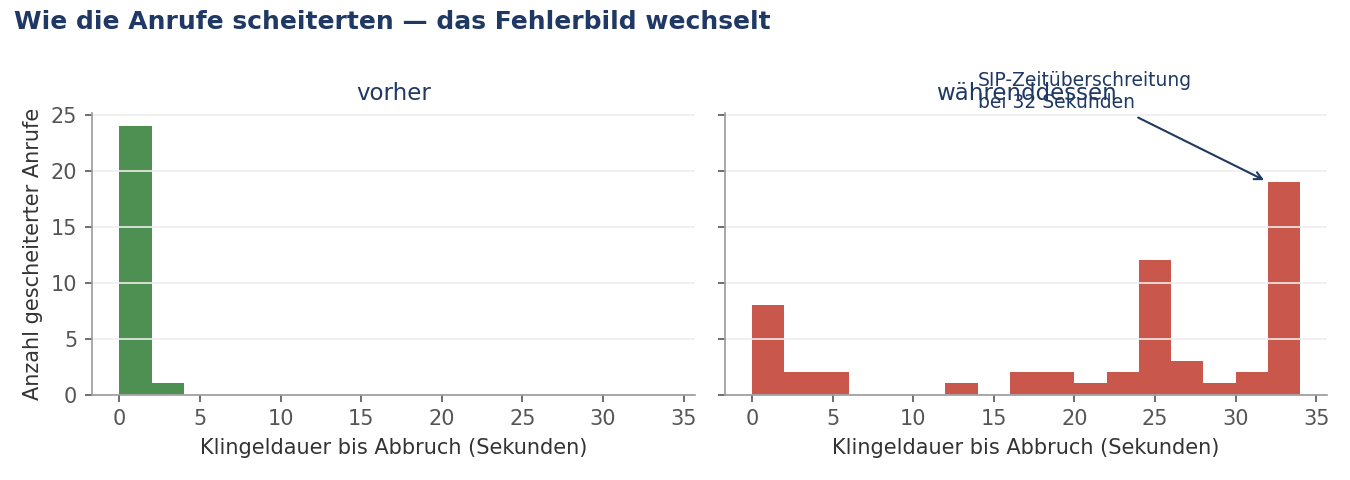
Successful calls rang for 5, 18, 20 seconds—irregular, like real ringing. Failed calls rang exactly 32.00 seconds. Five times in a row.
People don't five times in a row fail to answer at exactly 32.00 seconds. That's a stopwatch, not behavior. Thirty-two seconds is the SIP timer from RFC 3261—it fires when an INVITE receives no response at all.
The Information That Changed Everything
On the fourth day, the customer said something he'd never mentioned before: Calls stutter during conversation, and calls drop even though no one hung up.
Choppy audio and drops without disconnection are not a signaling problem. That's packet loss in the voice channel. And packet loss raises the question about network load.
The system provides the answer itself. In the support archive (Dashboard → Troubleshooting → Support Information), under DbTables/tsdb.network.csv, is a time series of network counters:
unzip -q SupportInfo.zip -d si/
head -3 si/DbTables/tsdb.network.csv
time,id,bytes_sent,bytes_received,unicast_packets_sent,unicast_packets_received,...
2026-09-03 09:38:00+00,ens3,209082823003370,115988774563,250385500933,866466488,...The counters are cumulative. The difference between two rows divided by the time span gives the rate:
import csv, datetime
rows = list(csv.DictReader(open('si/DbTables/tsdb.network.csv')))
prev = None
for r in rows[-6:]:
    t  = datetime.datetime.fromisoformat(r['time'][:19])
    ps = int(r['unicast_packets_sent'])
    if prev:
        dt = (t - prev[0]).total_seconds()
        print(f"{t}  {(ps-prev[1])/dt:>10,.0f} packets/s outbound")
    prev = (t, ps)
The result was nothing like a phone system:
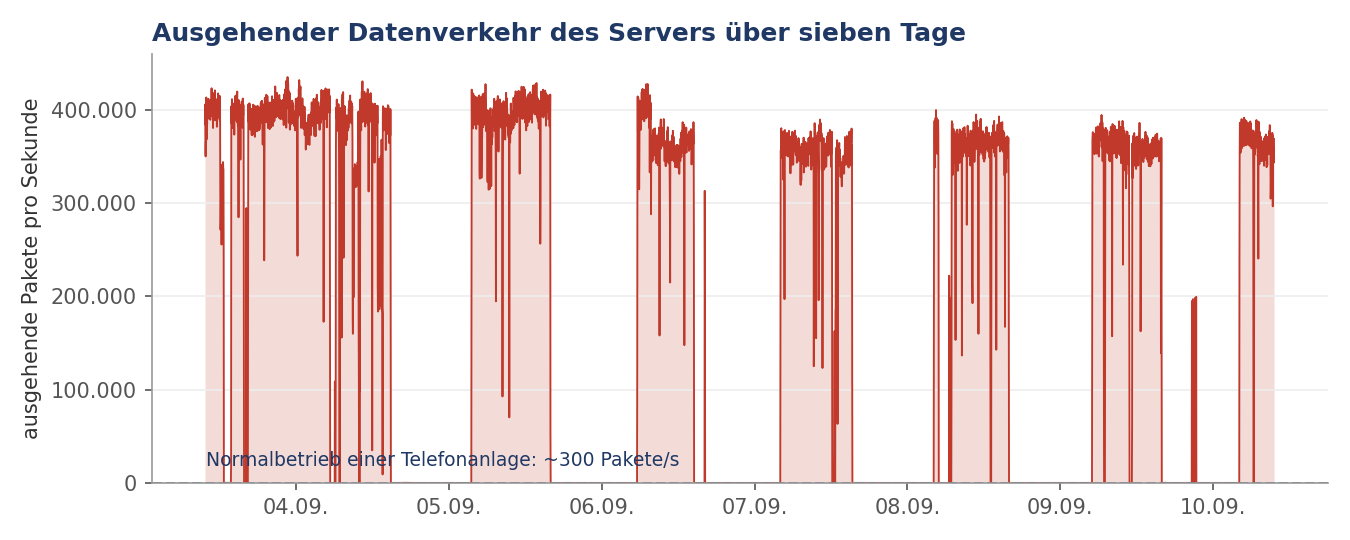
Median 762 Mbit/s at 110,000 packets per second outbound. Peak 4,232 Mbit/s at 435,273 packets. Inbound: 0.0 Mbit/s and 4 packets per second.
A phone system with eight channels generates a few hundred packets per second. The ratio of outbound to inbound was about 8500 to 1. The server itself generated this traffic—not a reflection attack, but a flood from the machine outward.
This explained all symptoms at once: With a saturated uplink, voice packets don't survive (the stuttering), SIP packets are lost (the 32-second timeouts), occasionally a registration dies (the trunk dropouts), and when no RTP arrives, 3CX ends the call (the drop without disconnection).
Verification from the Network Operator
A finding from your own logs is a finding from one source. The SIP provider maintains a rolling packet capture—usually only forty-eight hours, so you'd better ask early.
Within their window were 180 to 200 calls, roughly eighty percent successfully completed. Noteworthy was a small group of rejected outbound calls, all with the same pattern:
The provider requests authentication for outbound calls. The system acknowledges receipt of this request—and then the credentials don't follow.
| Normal case | In the failures | |
|---|---|---|
| Time between acknowledgment and authentication | ~100 milliseconds | 3.34 to 25 seconds |
That's the proof from the other side. The system received and acknowledged; its response was then lost or arrived a hundredfold late. An overloaded CPU or a broken system would look different—either would have prevented the acknowledgment.
Lesson Three: Ask the network operator, and ask early. From your own system, you only see that calls fail. The provider sees why. And their capture is gone in two days.
The Finding in the Support Archive
The same archive contains the process list:
grep -vi "3cx\|nginx\|postgres\|systemd\|kworker" si/ExtraLogging/tcxRunningProcesses_*.txtbldlvxlwvz 555 Start: 07.09.2026 11:58:03
bldlvxlwvz 34847 Start: 07.09.2026 13:57:29Ten random lowercase letters. No package, no service, no driver is named like that. Legitimate software has meaningful names because people need to find them.
PID 555 started in the same second as cron and dbus-daemon—that is, during boot.
Securing Evidence Before Cleanup
Before anything is touched: pull a backup, shut the server down cleanly, create an image.
The order matters. An ACPI shutdown instead of a hard power-off, so the database closes cleanly. Then an offline snapshot of the disk—it documents the scene and is the only basis for later analysis.
Cleanup itself is done from a recovery system with the disk mounted. The advantage: The malware isn't running and can't defend itself.
lsblk                      # identify the disk, in rescue mode often sda instead of vda
mkdir -p /mnt/alt
mount /dev/sda1 /mnt/alt
ls /mnt/alt                # etc, var, root, usr — then it's mounted correctly
The Hunt for Evidence
Understand first, then delete. The decisive question is always: How did it get in, and how did it stay?
A=/mnt/alt

# 1. all references to the malware process
grep -rl "bldlvxlwvz" $A/etc 2>/dev/null
find $A -name "*bldlvxlwvz*" 2>/dev/null

# 2. autostart locations
ls -la $A/etc/init.d/ $A/etc/cron.d/ $A/etc/cron.hourly/
cat $A/etc/crontab
ls -la $A/etc/rc*.d/ | grep -i bldl

# 3. foreign access keys?
cat $A/root/.ssh/authorized_keys

# 4. timestamps—they tell the timeline
ls -la $A/etc/init.d/bldlvxlwvz $A/usr/bin/bldlvxlwvz $A/etc/shadow $A/etc/passwd
The findings:
-rwxr-xr-x  114155  Aug 24 03:29  /usr/bin/bldlvxlwvz
-rwxr-xr-x     323  Sep  7 09:58  /etc/init.d/bldlvxlwvz
-rw-r--r--    1185  Okt  6  2024  /etc/passwd
-rw-r-----     692  Okt  6  2024  /etc/shadow
/etc/shadow unchanged since first installation—the password was never changed. No foreign SSH keys. The binary arrived on August 24, the boot hook only two weeks later.
And in /etc/cron.hourly/gcc.sh was the second stage:
#!/bin/sh
for i in `cat /proc/net/dev|grep :|awk -F: {'print $1'}`; do ifconfig $i up& done
cp /lib/libudev.so /lib/libudev.so.6
/lib/libudev.so.6
And in /etc/crontab:
*/3 * * * * root /etc/cron.hourly/gcc.shEvery three minutes. /lib/libudev.so is not a library but a second payload disguised as a system file—the signature of a known Linux DDoS family.
file $A/lib/libudev.so
# ELF 32-bit LSB executable, Intel i386, statically linked, stripped
Also created were four empty systemd unit files with the names of security agents from major Asian cloud providers. On a European server, they serve no function—they're there so real agents don't start on typical target systems. A sign of mass attack rather than targeted activity.
How Deep Does the Damage Go?
Before cleanup, the most important check: Were system tools replaced?
ls -la $A/bin/ls $A/bin/ps $A/bin/netstat $A/bin/ss $A/usr/bin/top $A/usr/bin/find
find $A/bin $A/sbin $A/usr/bin $A/usr/sbin $A/lib $A/usr/lib \
     -newermt "2026-08-23" -type f 2>/dev/null
All core binaries carried unchanged their original package data from 2022 to 2025. In system directories, exactly two files had been written since August 23—both belonged to the malware.
No rootkit. The footprint was small.
Lesson Four: This check determines whether cleanup is even defensible. If it comes out differently, only reinstallation helps. And even with this result, reinstallation remains the cleaner choice—the cleanup was here a deliberate trade-off between effort and downtime, not a recommendation.
Cleanup
A=/mnt/alt

rm -f $A/usr/bin/bldlvxlwvz $A/usr/lib/libudev.so $A/lib/libudev.so.6
rm -f $A/etc/init.d/bldlvxlwvz $A/etc/cron.hourly/gcc.sh
rm -f $A/etc/systemd/system/{YDService,aliyun,tat_agent,aegis}.service

cp -a $A/etc/crontab $A/etc/crontab.bak
sed -i '/gcc\.sh/d' $A/etc/crontab
The rc symlinks need attention—we fell into a trap here:
# WRONG: -e follows the symlink whose target is already deleted → test fails
for n in 1 2 3 4 5; do
  f=$A/etc/rc${n}.d/S90bldlvxlwvz
  [ -e "$f" ] && rm -f "$f"
done

# RIGHT: -L checks the symlink itself
for n in 0 1 2 3 4 5 6 S; do
  f=$A/etc/rc${n}.d/S90bldlvxlwvz
  { [ -L "$f" ] || [ -e "$f" ]; } && rm -f "$f" && echo "removed: $f"
done
Lesson Five: After deleting the target, every symlink to it is a dead link.
[ -e ]then says "does not exist"—and the autostart entries remain. Only the verification search showed it.
Hardening access, also offline:
cp -a $A/etc/ssh/sshd_config $A/etc/ssh/sshd_config.bak
sed -i 's/^[[:space:]]*PermitRootLogin.*/PermitRootLogin prohibit-password/' $A/etc/ssh/sshd_config
sed -i 's/^[[:space:]]*PasswordAuthentication.*/PasswordAuthentication no/'  $A/etc/ssh/sshd_config
grep -q "^PasswordAuthentication" $A/etc/ssh/sshd_config || \
  echo "PasswordAuthentication no" >> $A/etc/ssh/sshd_config

mkdir -p $A/root/.ssh && chmod 700 $A/root/.ssh
echo 'ssh-ed25519 AAAA... admin@arbeitsplatz' >> $A/root/.ssh/authorized_keys
chmod 600 $A/root/.ssh/authorized_keys
Updates in Chroot
The system was offline and needed to come back up patched. That works in chroot—with two precautions:
for m in dev dev/pts proc sys; do mount --bind /$m $A/$m; done
cp -a $A/etc/resolv.conf $A/etc/resolv.conf.bak
cp /etc/resolv.conf $A/etc/resolv.conf

# services must not start in chroot
printf '#!/bin/sh\nexit 101\n' > $A/usr/sbin/policy-rc.d && chmod +x $A/usr/sbin/policy-rc.d

chroot $A apt-get update -qq
chroot $A bash -c 'DEBIAN_FRONTEND=noninteractive apt-get -y \
  -o Dpkg::Options::="--force-confdef" \
  -o Dpkg::Options::="--force-confold" full-upgrade'
--force-confold is not a convenience here but a necessity: without this option, the update would overwrite the newly hardened sshd_config.
An apt-get autoremove then removed the postgresql metapackage. It looked concerning, but was harmless—the actual database remained:
chroot $A dpkg -l | grep postgres
# ii  postgresql-15  15.19-0+deb12u1
Don't forget to clean up:
rm -f $A/usr/sbin/policy-rc.d
mv -f $A/etc/resolv.conf.bak $A/etc/resolv.conf
for m in sys proc dev/pts dev; do umount -l $A/$m; done
sync && umount $A
Proof That It Held
After restart, without the recovery system:
# Is anything foreign running?
find / -name "*bldlvxlwvz*" -o -name "gcc.sh" -o -name "libudev.so.6" 2>/dev/null

# And the number that matters
P1=$(cat /sys/class/net/ens3/statistics/tx_packets); sleep 30
P2=$(cat /sys/class/net/ens3/statistics/tx_packets)
echo "$(( (P2-P1)/30 )) packets/s outbound"| before | after | |
|---|---|---|
| Outbound packets | 370,000/s | 4/s |
| Outbound traffic | 2,400,000 kbit/s | 3 kbit/s |
How Did the Attacker Get In?
The log seemed clear: 17,403 failed login attempts, then a successful one. Classic brute force.
zgrep -h "Accepted" /var/log/auth.log* | grep -v CRON2026-08-24T05:28:59+02:00 Accepted password for root from 45.148.10.157
2026-08-24T05:29:30+02:00 Accepted password for root from 23.160.56.218Then came the customer's information: The password was at least twelve characters long, from a mixed set of uppercase and lowercase letters, digits, and special characters, and used nowhere else.
Twelve characters from that character set alone gives around 10²² possibilities. At fifteen attempts per minute, that's not searchable in human timescales. The brute-force hypothesis was mathematically dead.
Looking at the raw log confirmed it independently:
zgrep -h "45.148.10.157" /var/log/auth.log* | grep -E "Failed|Accepted" | tail -82026-08-24T04:15:34 Failed password for root from 45.148.10.157
2026-08-24T05:28:59 Accepted password for root from 45.148.10.157Seventy-three minutes between the last failed attempt and success. Not a single attempt in between. And the second address, 23.160.56.218, had not a single failed attempt in the entire log—it appeared at 05:29:30 for the first time ever, succeeded immediately, and disappeared after six seconds.
Both sessions lasted fractions of a second and six seconds respectively. Not a human at a keyboard, but commands sent automatically.
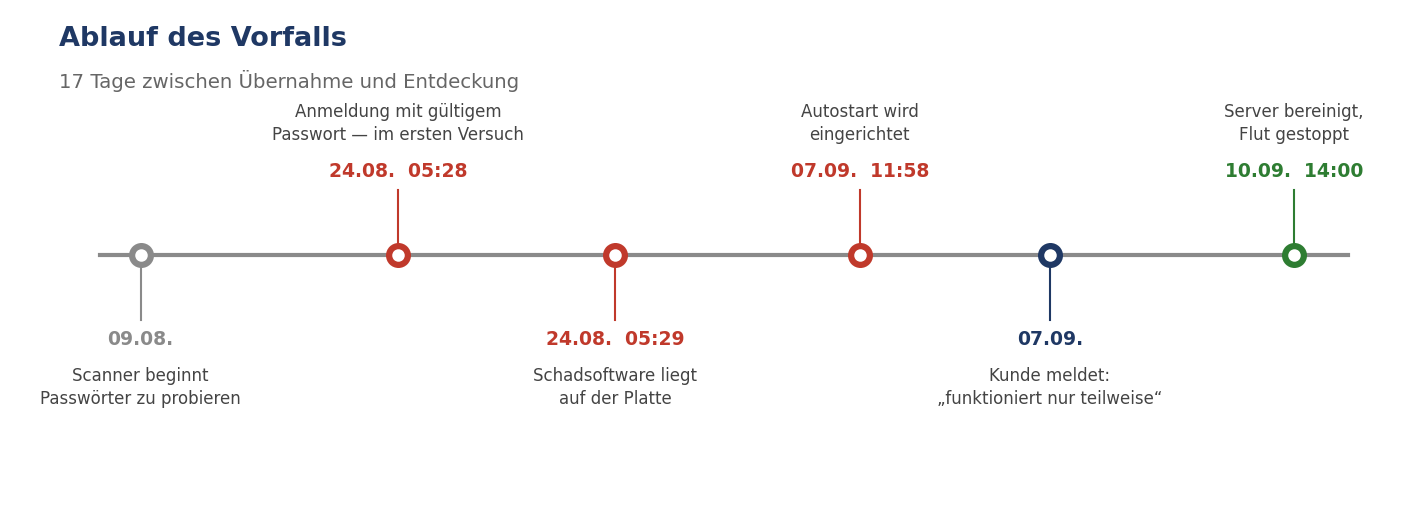
Lesson Six: A successful login amid brute-force noise is not proof of brute force. Check the time between the last failed attempt from the same address. A guessing tool doesn't pause and then hit on the first try.
The password was known before it was used. The breach happened outside this server—the 17,403 guessing attempts were background noise, not the entry point.
This shifts the entire investigation: The server was the target, not the source. To know how it happened, you must search where the password was kept.
What the Outage Cost
The real damage was not in the data traffic, but in the calls that reached no one.
The system received calls and forwarded them to an external phone service. Whether a caller reached an actual person depended on the forwarding leg—not the incoming leg.
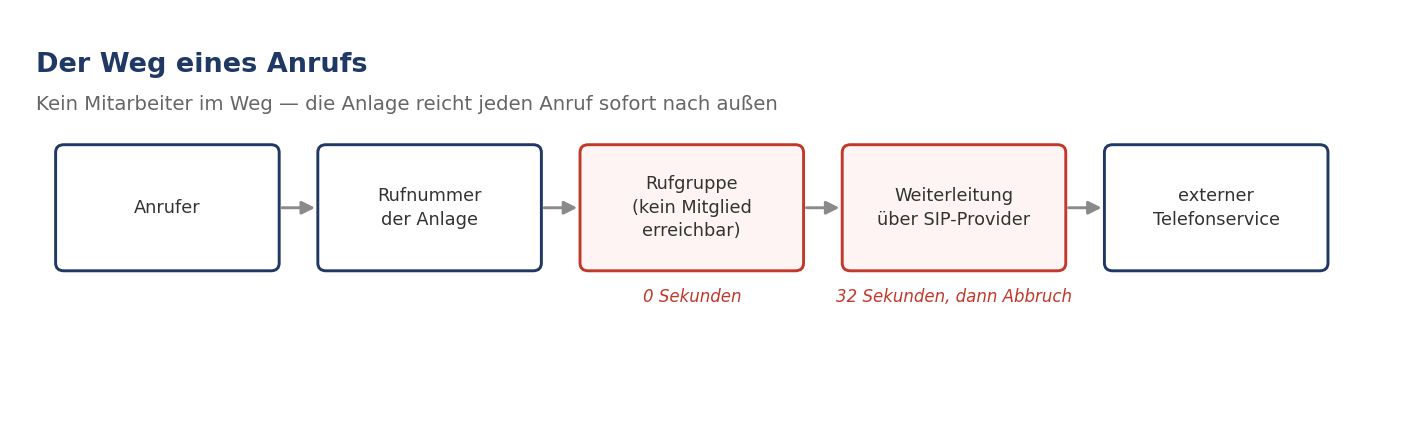
We initially overlooked this distinction and compared the wrong metric. The right one:
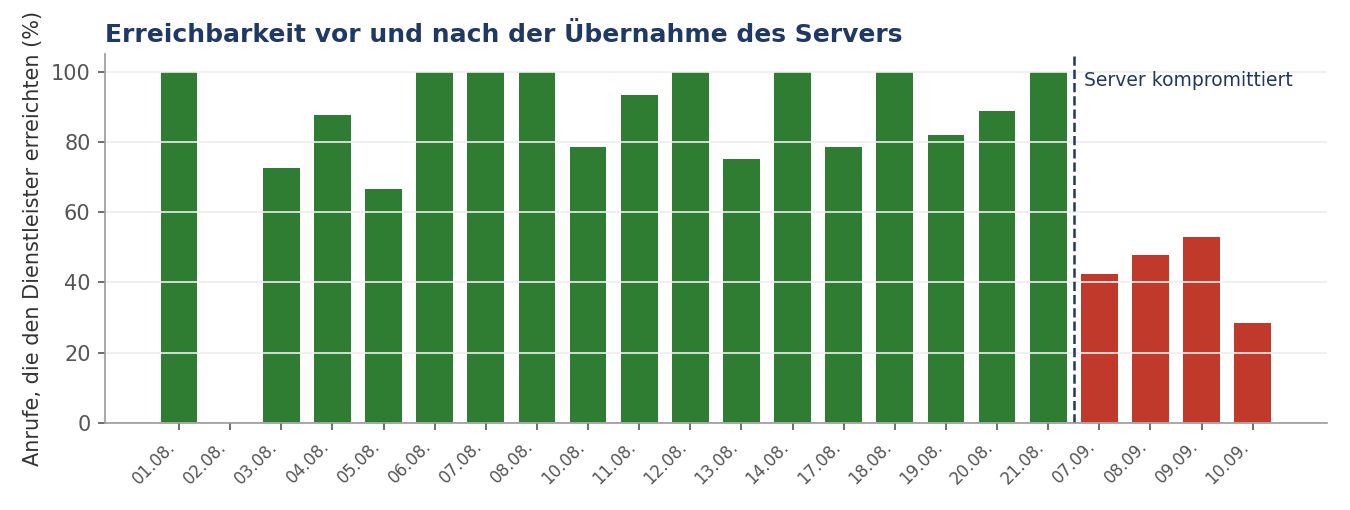
| Period | Forwards | Reached | Rate |
|---|---|---|---|
| before compromise | 165 | 140 | 85% |
| during attack | 104 | 47 | 45% |
More telling than the rate is the change in the failure pattern: Before, calls failed after zero to two seconds—busy signal, the normal case. After, after thirty-two seconds—timeout, meaning no answer at all.
Excluding internal test numbers: 14 of 38 external callers never reached anyone in four days. One tried seven times.
Lesson Seven: Check whether your metric measures what matters. "Calls answered" means something completely different in a system designed to forward everything than "caller reached someone."
A Mistake We Made
At the end, remote access was to be blocked. The plan seemed harmless: the implicit rules of the packet filter were set to accept all in both directions, so a single DROP rule for port 22 on top should only hit SSH.
But when activated, the provider's firewall changed the implicit inbound rule to drop all. A whitelist became a blacklist. Only ping was allowed.
The phone system was immediately completely offline. A port test showed it in seconds:
for p in 22 443 5060 5061 5090; do
  timeout 5 bash -c "cat < /dev/null > /dev/tcp/203.0.113.42/$p" 2>/dev/null \
    && echo "$p open" || echo "$p closed"
done
Lesson Eight: You cannot infer the state of an active firewall from an inactive one. The correct order is: first create the allow rules (TCP 80, 443, 5060, 5061, 5090 and UDP 5060, 5090, 9000–10999), assign them, then place the block rule behind them, then activate—and immediately after, make a test call and access the web interface.
The Gap That Let the Outage Last Seventeen Days
One question remains beyond the technical: How can a situation exist for seventeen days in which a significant portion of calls reaches no one without anyone intervening?
The external phone service kept its promise. A notification was sent for every unanswered call. The information existed—it just reached the recipient in a form that didn't trigger action. Individual messages at normal frequency don't signal an alarm. Only their accumulation does, and no one analyzed that.
The same pattern appears in two other places in this case:
- The failure of one trunk appeared every five minutes in the event log for months. No one read it.
- The 17,403 failed login attempts were fully logged. Yet they never triggered an alert.
Three times the same gap: the data existed. What was missing was the threshold at which data becomes a notification.
Lesson Nine: Logging is not monitoring. A system that reliably sends every individual message but doesn't recognize patterns produces recipients who are formally informed yet practically clueless. Set a threshold—for instance, a notification to a named person as soon as more than n calls go unanswered in a day. This is not a technical decision but an organizational one.
Remarkable was the customer's reaction. His anger was not about the outage. It was about the fact that no one had called to say: Your calls are failing en masse today.
What Remains
The system was never broken. The configuration was correct. Four days of troubleshooting and four discarded theories lay between the initial report and the diagnosis—and none of the four was unreasonable, just wrong.
What brought the breakthrough was not a tool but a sentence from the customer: Calls stutter and drop. This observation had existed for weeks and reached us on day four. It would have shortened the search by three days.
Therefore, to both sides:
Whoever reports an outage should provide three things—since when, to whom, and what exactly the other side hears. "Only partially working" is technically unusable.
And whoever investigates an outage should ask about it instead of guessing. We didn't, and that's the real reason it took four days.
Checklist
When hearing "only partially working"
- What does the caller hear? Stuttering, silence, announcement, busy signal?
- Does it affect inbound or outbound calls, all callers or some?
- Since exactly when?
Before touching credentials
- Is the connection with the provider even still active?
- Is the invoice paid?
For sporadic connection drops
- Analyze network counters, don't guess
- Check the ratio of outbound to inbound—asymmetry is a warning sign
- Identical drop times always point to a timer, not behavior
For sporadic SIP trunk issues
- Ask the network operator for their packet capture—immediately, it's often gone after 48 hours
- Ask about the time between authentication request and response
- Clarify how long he retains the data and to whom he can release it
When suspecting compromise
- Pull a backup and download it before anything is changed
- Shut down cleanly, then create an offline image
- Work from the recovery system, not the running system
- Document first, then delete
- Check whether system binaries were replaced
- For root compromise, reinstallation is the standard
All names, companies, phone numbers, and server addresses in this text have been changed. The attacker IP addresses are reproduced unchanged.