KIM after PC replacement: Four causes one after another
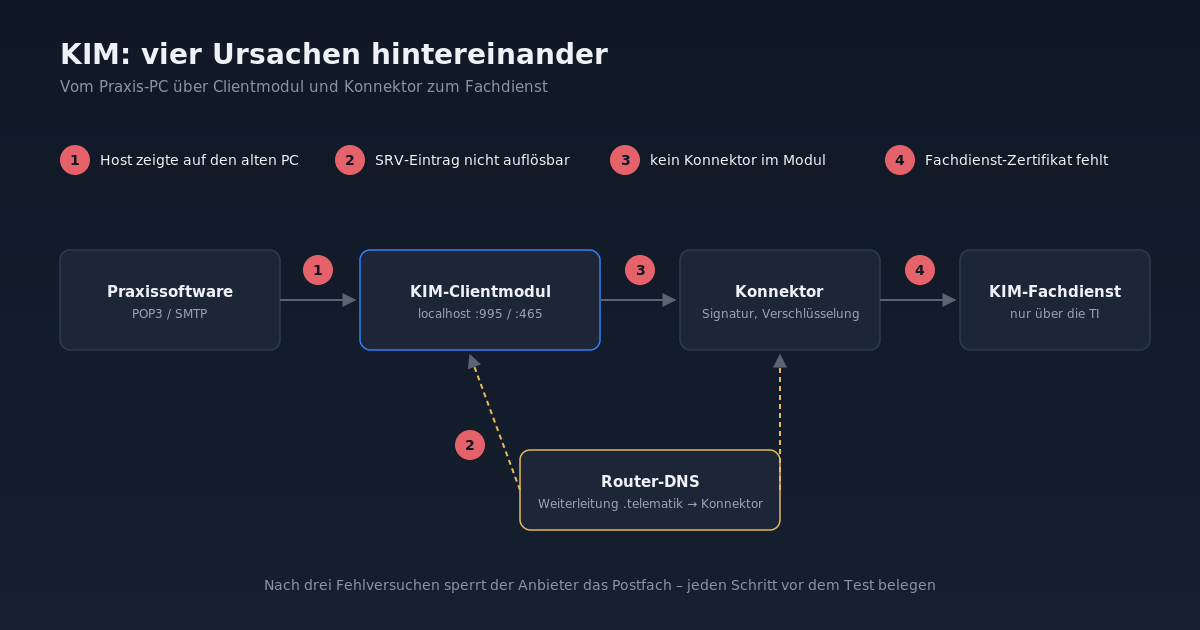
After the front-desk PC was replaced, KIM refused to work. Four causes lay one after the other — and after three failed attempts, the provider locks the mailbox.
KIM, "Communication in Medicine", is the e-mail service of the telematics infrastructure (the German healthcare network). Electronic doctor's letters, electronic sick notes and messages between practices, insurance companies and laboratories run through it. At a dental practice, the front-desk PC needed to be replaced (project review). The practice management software ran on the new computer, the card terminals did too — only KIM refused to work.
In the end, there were four causes, one after the other. Each one is simple by itself. Together, they are a good example of why telematics infrastructure problems should be solved layer by layer, rather than adjusting multiple points at once.
A heads-up first that shapes the whole job: After three failed login attempts, the KIM provider locks the mailbox. Every test must work. Blind trial and error is not an option.
How KIM works technically
The practice management software does not communicate directly with the KIM server. Between them sits the KIM client module, a local service that behaves like a normal mail server for the practice management software (POP3 on port 995, SMTP on port 465). The module handles encryption and signature via the connector and forwards messages to the KIM provider's service that is only reachable via the telematics infrastructure.
Cause 1: The practice management software pointed to the old PC
The first error message was clear: Connection rejected when connecting to an IP address in the practice network. This address did not belong to the connector, but to the old front-desk PC. The "IP of KIM host" setting had been carried over from the old configuration.
On top of that: the client module on the old PC was only bound to localhost and generally does not accept connections from other computers. On the new PC, no module was installed yet.
Solution: installed the client module on the new PC via the practice management software (current version with KIM 1.5) and changed the KIM host to localhost.
Cause 2: DNS did not know .telematik
The next test message failed at login. The module's log was clear:
Der Eintrag _fdkimpop._tcp.<anbieter>.kim.telematik des Typs SRV konnte nicht aufgelöst werden.Newer client modules for KIM 1.5 determine the responsible mail server via DNS SRV entry. The old module had the server hardcoded and did not need this. But names under .telematik are only known to the connector's DNS server, not to the practice's internet router.
A counter-test with nslookup made it visible: when asked directly at the connector, the SRV entry came back with server and port. When asked at the router, it said "Non-existent domain".
Solution: Set up conditional DNS forwarding in the router. The domains telematik and splitdns.ti-dienste.de are forwarded to the connector. By the way, the instructions from practice management software vendors explicitly mention this forwarding as a requirement. In practice, it is often missing because it worked without it on older modules.
Cause 3: No connector in the module
Even after the DNS fix, the test continued to fail, again before login. A counter-test with the Java runtime and the DNS library that the module itself uses showed: resolution was now working perfectly. DNS was no longer the cause.
Looking at the module's configuration directory revealed the actual finding: the connector configuration was completely missing. The newly installed module simply did not know which connector to use for signature and encryption.
Solution: In the module's administration interface (local browser), we created the connector with address, tenant, client system and workplace. The values correspond to the practice management software's call context and can be taken from the old installation.
Cause 4: The service certificate
The last hurdle is not a real fault, but a normal step after each fresh installation: the module needs a TLS client certificate for the service. It is obtained on the module's first login attempt ("Login KIM user"), and the mailbox owner enters their password.
After that, the test message from the practice management software went through, sent and received.
What to take from this
- Think about the client module when replacing the PC. It is a separate installation with its own configuration, not part of the practice management software that moves along automatically.
- Confirm the cause before each test. Because of the mailbox lock after three failed attempts, we verified every step with logs,
nslookupor port checks before triggering the test message. - DNS forwarding for
.telematikis standard equipment. From KIM 1.5 onwards, it does not work without it. - Read the module's log file. The error messages in the practice management software are generic. The module's log almost always tells us exactly which step fails.