3.9 MB for a thumbnail-sized image: the gap in the selection list
A thumbnail loaded 3.9 MB, other images remained completely empty on the phone. Both traced back to the same cause: a gap in the selection list — and an AVIF stub of 145 bytes.
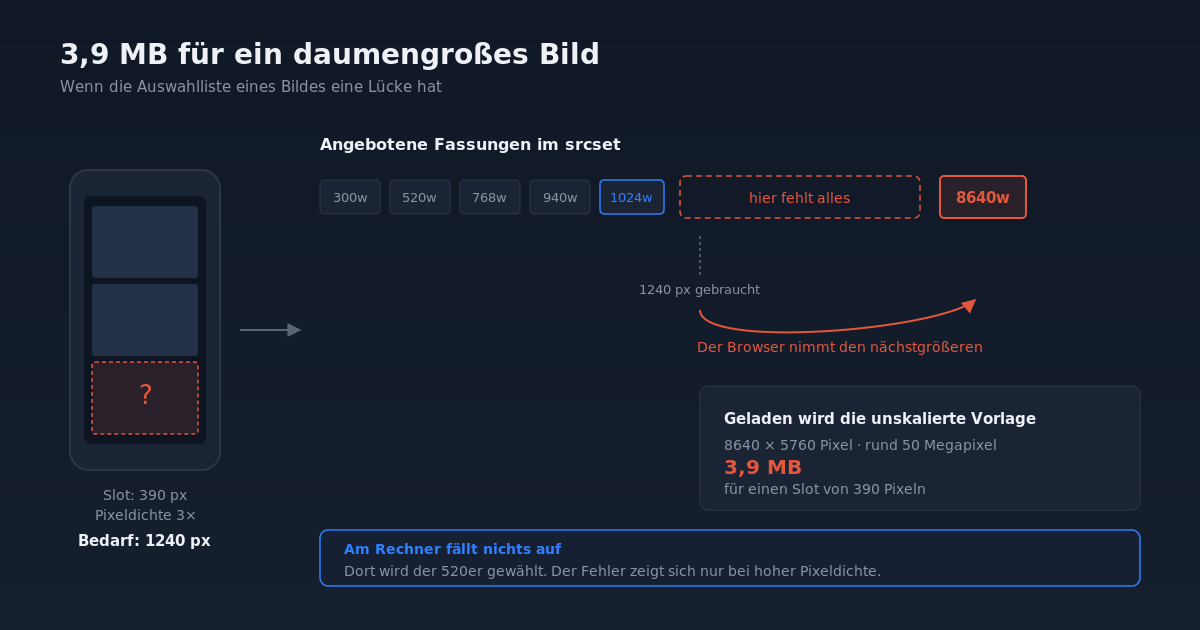
On a photographer's website, a customer contacted us with a screenshot from their phone. In a gallery, instead of a photo, there was an empty box with a question mark. Not everywhere, but with several images. On desktop, everything looked fine.
Such reports initially sound like a loading error or poor mobile connection. The cause ran deeper, and it also explains why photo sites often transfer unnecessarily large amounts of data on phones.
The diagnosis
An image on the web is not delivered as a single file, but as a list of versions. The browser picks the right one from this list. However, the server does not know how wide the image will actually be displayed — it writes an estimate into the sizes attribute, and the browser decides based on that.
Looking at the page source showed the list for one of the affected images:
300w, 520w, 768w, 940w, 1024w, 8640wNothing lay between 1024 and 8640. The reason: on this installation, the usual intermediate sizes from WordPress were disabled, and the template came directly from a 50-megapixel camera.
So the error was explained. A phone with triple pixel density displays the image 390 pixels wide and needs around 1240 actual pixels for that. The largest candidate below that is 1024 — too small. So the browser correctly picks the next larger one, and that is the unscaled template. On desktop without high pixel density, the same browser selects the 520 version and notices nothing.
Measured across seven posts: 390 images, of which 334 had a candidate above 2048 pixels. A single thumbnail pulled 3.9 MB.
That left the question of why some images did not appear at all. The answer lay in the file size:
…_11.avif      145 bytes
…_11.webp  3,977,666 bytes
…_11.jpg   1,792,553 bytes
The AVIF version of the template was 145 bytes large. The encoder had failed on the 50 megapixels and left behind an empty shell — a file with a header and no image. The plugin had only checked whether the file exists, and dutifully delivered it. On desktop this went unnoticed because a smaller, intact version was selected there.
The solution
Three interventions that belong together.
1. Cap the selection list. The unscaled template has no place in the grid. It remains reserved for the full view, where the visitor explicitly wants to see detail:
// First cap, then reencoding: the original then appears neither as a
// JPEG nor as an AVIF or WebP candidate in the grid.
$srcset = self::grid_srcset( $img['srcset'], (int) BBG_Settings::get( 'grid_max_width', 2048 ) );
2. Check rather than trust. Existence is no proof of usability. The core function wp_get_image_mime() reads the identifier at the beginning of the file and answers exactly this question:
$bytes = @filesize( $target );
if ( false === $bytes || $bytes < BBG_Image::MIN_VARIANT_BYTES ) {
	return false;
}

// Determine format from the file itself, not from the extension.
$mime = wp_get_image_mime( $target );

return 'avif' === $format ? 'image/avif' === $mime : 'image/webp' === $mime;
If the check fails, the file is deleted rather than kept. This matters because a leftover shell would otherwise count as completed work on each subsequent run and never be regenerated.
3. Supply the missing intermediate size. The cap alone fixes the grid, but leaves 1024 as the largest version. Only a true 2048 closes the gap. Notably, scaling down the 50-megapixel template worked without problems — WordPress had generated the versions up to 1024 from it. It was only the AVIF encoding at full resolution that failed.
What came of it
This fix became its own gallery plugin, BitBlade Gallery. It measures the actual width of each image slot after the page is built and enters it into the sizes attribute instead of relying on an estimate. Portrait and landscape formats sit side by side in rows of equal height, without cropping. The full view zooms into the unscaled template.
The plugin has been submitted to the WordPress directory. The source code is included with this post (ZIP, 182 KB, GPL-2.0-or-later).
One detail from the submission that can cost time: Plugin URI and Author URI must not carry the same address in the plugin header. Both fields are optional, but they cannot be identical. Otherwise the submission is automatically rejected before a person looks at it.
What to take from this
- An image is a list, not a file. Anyone who disables image sizes changes that list. Gaps in it cause the browser to reach upwards.
- High pixel density triples the requirement. What is unobtrusive on desktop can demand triple the resolution on a phone — and thus a completely different file.
- Errors that occur only on one device type are almost always selection errors. The file is fine; the statement about it is not.
file_exists()is not a quality check. Image libraries report success with very large templates and still write an unusable file. Check minimum size and file signature.- Encoders have limits, scalers have hardly any. The same template that AVIF encoding failed on could be scaled down to 2048 pixels without trouble.
- When in doubt, measure rather than assume. The error only became visible when we queried the actual file sizes delivered instead of reading the source code.